
Size and holes
Raptor Pilot Pro FC comes in its enclosure: 42.75 × 57.75 × 20.75 mm, 40 g.
The board inside is 40.0 × 55.0 mm with 3.0 mm corner radii. It has two plated mounting holes, Ø3.0 mm, in opposite corners. Each hole centre is 3.5 mm from the two nearest edges, so the centres are 33.0 mm apart across the board and 48.0 mm apart along it. There is no 30.5 × 30.5 mm pattern. The drawing shows the board from below, as it sits on the airframe: use it to drill the two holes in your frame.
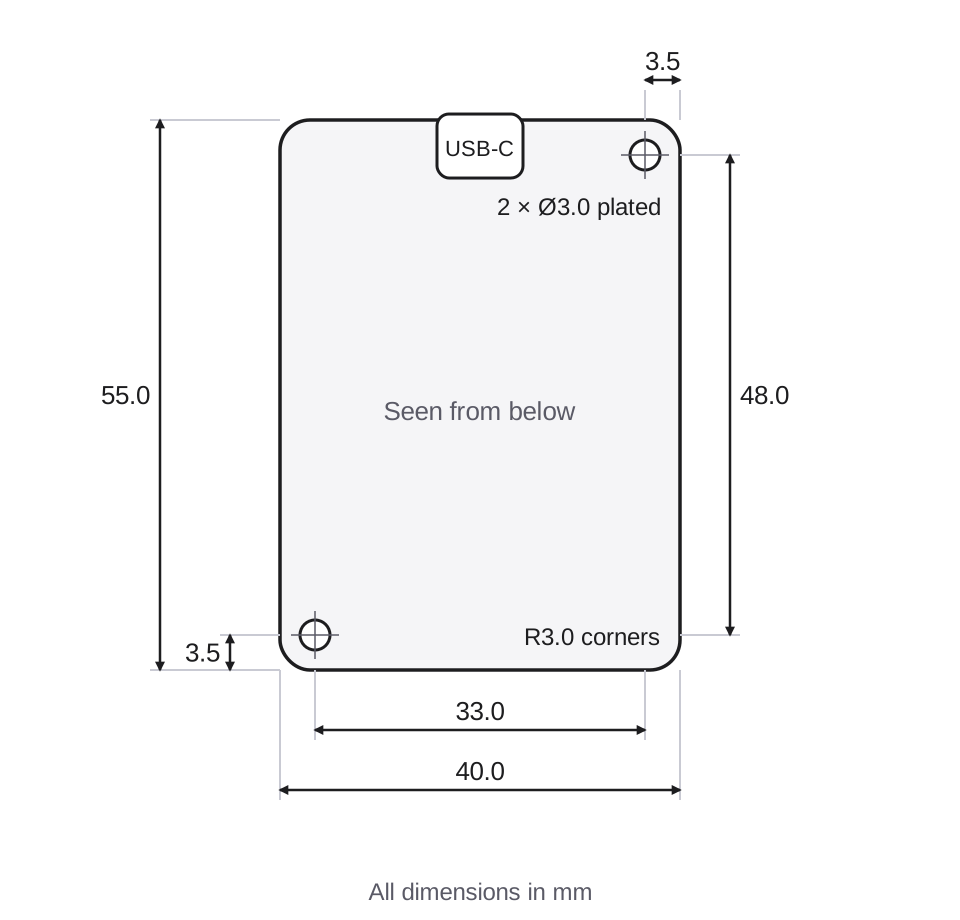
Which way is forward
The USB-C port points forward. Mount the flight controller with USB-C to the front of the aircraft and the raised cover on top. That is the default, AHRS_ORIENTATION 0 (None).
If it has to sit another way, set AHRS_ORIENTATION to match, then calibrate the accelerometers again. See Mounting the autopilot in the ArduPilot documentation.
Fixing it to the airframe
We suggest two things together: a layer of 3M double-sided foam tape under the enclosure, and two M2 screws through the frame into the base of the enclosure. The screws go in at the two hole positions in the drawing above.
Warning
Use M2 screws, and let them go no more than 3.5 mm into the enclosure. A longer screw can reach the board and damage it. Choose the screw length as the thickness of your frame plus the foam tape, plus 3.5 mm at most.
Do not use rubber balls or other soft dampers. The ADIS16470 is a tactical-grade IMU and should move with the airframe, not against it. If your logs show high vibration, look for loose cables and parts first.